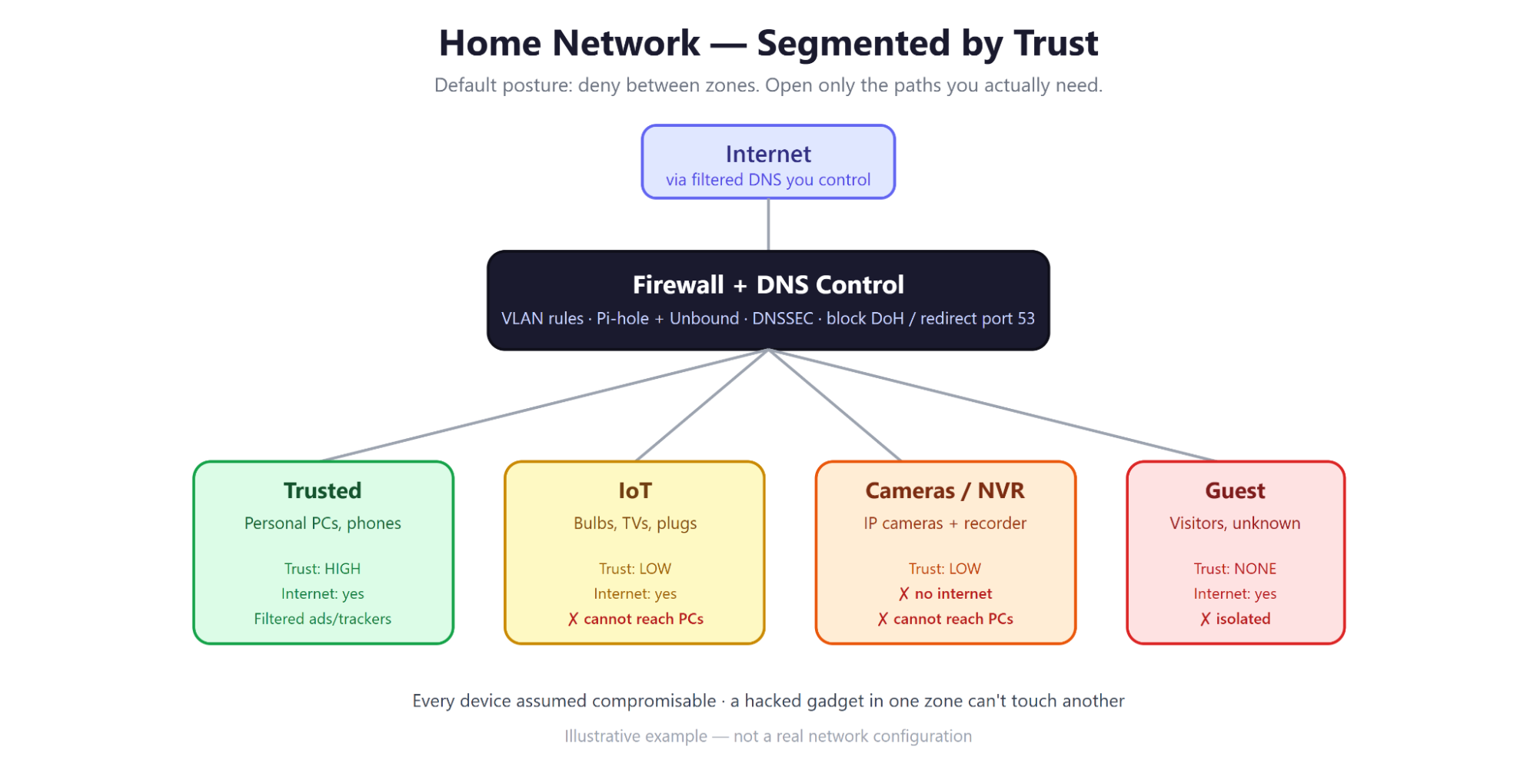
A "here's what I did" walkthrough for the PAX panel
Note: All addresses, subnets, and device names in this document are generic examples for illustration. They are not the values from any real network. The point is the approach, not the config — copy the thinking, not the numbers.
My home network isn't one flat network where everything can talk to everything. It's segmented by trust, every device is forced to use filtered DNS it can't escape, and the whole thing gets audited by a script so I actually know it's working instead of just hoping.
Three ideas do most of the heavy lifting:
None of this requires enterprise gear. It runs on a consumer/prosumer firewall, a small VM, and some free software.
And I didn't design it alone — I used AI as a security consultant to interview me, draft the plan, and help me implement and test each piece. More on that below.
A hacked gadget in one zone can't reach another. That's the whole idea in one picture.
Instead of one big network, I split things into separate VLANs based on how much I trust the devices on them. A rough picture:
|
VLAN (example) |
What lives here |
Trust |
Internet |
Can reach my PCs? |
|
Default / Trusted |
My personal PCs, phones |
High |
Yes |
— |
|
Secure |
Work devices, sensitive stuff |
High |
Yes |
Limited |
|
IoT |
Smart bulbs, TVs, speakers, plugs |
Low |
Yes |
No |
|
Cameras / NVR |
IP cameras + recorder |
Low |
No |
No |
|
Guest / Untrusted |
Visitors, random devices |
None |
Yes |
No |
Why it matters: the scary thing about a cheap smart plug isn't the plug — it's that a compromised plug on a flat network can scan and attack your laptop, your NAS, your files. Put it on its own VLAN with a firewall rule that says "you may talk to the internet but not to my trusted devices," and that whole attack class goes away.
The mental model I used for every firewall rule was a simple template:
Name: <what this rule does>
Source zone: <trusted / iot / guest / cameras / ...>
Destination: <zone, IP, domain, or region>
Action: allow | block | reject
Ports/Protocol: <as needed>
State: new / established / related
Default posture is deny between VLANs, then I open only the specific paths I actually need (e.g., "trusted PC → media server on port X"). Everything else is blocked by default rather than allowed by default.
DNS is the phone book of the internet. If you control it, you can block ads, trackers, malware domains, and telemetry for every device at once — including the ones with no settings screen.
What I run:
The part most people forget — stopping the bypass. Filtering DNS is easy; enforcing it is the real work. A device (or malware) can dodge your filtering by:
So the firewall does three extra things:
The result: a device thinks it's talking to Google DNS, but the network quietly serves it my filtered answers instead.
This is the piece I'm most proud of and the most "engineer" part of the project.
I wrote a read-only audit script that runs from any machine and checks that the network is actually behaving the way the policy says it should. It:
Two design choices worth calling out for the panel:
Security you can't verify is just a hope. This turns "I think it's set up right" into "I ran the check and here's proof."
Once you control DNS, you get a privacy win almost for free. Every website visit starts with a DNS lookup, so whoever answers those lookups sees a running log of what everyone in the house does — normally that's your ISP or a big DNS provider, quietly building a profile of the household.
What I did about it:
The common question — "doesn't that just move the watching to the authoritative servers?" — has a clean answer: each of those servers only sees requests for its own domains, so nobody gets the aggregated, whole-house picture an ISP or forwarding resolver would. You've shrunk both who can watch and how much there is to watch.
The panel is partly about using AI for this, so honestly — AI was my security consultant for the whole project. The single most valuable move was treating it as a specification engine, not a code vending machine. Here's the workflow that actually worked:
1. Have the AI interview me to build the spec. I didn't ask "write me a secure config." I asked the AI to interview me — to keep asking questions until it understood my network well enough to write a specification. That flipped the dynamic: instead of me guessing what to tell it, it drew the requirements out of me. We went through many, many rounds of questions — how many VLANs, what lives on each, what should and shouldn't talk to what, what happens when the resolver is down, how IPv6 should behave, and so on. The output was a written specification for how my network should be configured.
2. Use the spec as the single source of truth. That document became the guiding light. Every improvement traced back to a line in the spec, so I was implementing a plan rather than tinkering. It also meant "done" had an actual definition.
3. Implement the spec one piece at a time — with AI as a pair. I worked through the spec section by section, asking for help implementing each piece: the VLAN rules, the Pi-hole + Unbound setup, the DoH blocking, the audit script. Small, reviewable chunks instead of one giant leap.
4. When reality disagreed with the spec, update the spec first. This is the part I'd underline for the audience. As I found bugs and edge cases during implementation, I didn't just patch the config and move on — I had the AI update the specification so it stayed the source of truth. The spec and the network never drifted apart. Months later I can read the spec and it still describes what's actually running.
A few specific prompts from along the way:
AI was great for turning "I have a vague worry" into "here is the specific thing to test," and for holding the whole design in one coherent document. I still verified everything it produced — treat it as a very well-read consultant, not an authority.
This isn't magic, and I'd rather you hear the caveats from me than learn them the hard way:
If you do just one thing this weekend: don't build all of this. Pick the single highest-value step your gear already supports —
You can layer on VLANs, Unbound, and the audit script later. The mindset — assume compromise, isolate, and verify — matters more than doing all of it at once.
Rough cost: a spare VM (or a Raspberry Pi / old PC) and a VLAN-capable router (many under $200 used) plus a few weekends. This is a hobbyist project, not a data-center budget.
1. Assume any device can be compromised — so segment by trust, force everything through DNS you control, and write something that proves it's still true.
2. Use AI as your security consultant — let it interview you to build a custom plan, then help you implement each piece and test that the config actually works.